By now, you have two important pieces in place: you understand Why IEC 62304 traceability matters, and you have structured Jira so that requirements, software items, tests, and other development artifacts can be connected.
But there's still a practical question: how do you turn those Jira relationships into a Requirements Traceability Matrix you can actually review?
That's where many teams leave Jira and start rebuilding traceability in Excel or Google Sheets. The problem is that the relationships already exist in Jira — and the spreadsheet quickly becomes a second source of truth.
In this article, we'll look at what an RTM should contain, why manual RTMs become difficult to maintain, and how Links Explorer can use the Jira relationships you already have to create a traceability view.
What should an IEC 62304 RTM contain?
| RTM field |
What it tells you |
| Unique requirement ID | Which requirement is being traced |
| Description / classification | What the requirement means and how it is classified |
| Source | System requirement, risk control, or other source |
| Software item / architecture | What implements the requirement |
| Verification method | How it is verified |
| Verification reference | Test case, result, or evidence reference |
| Status | Implemented, verified, released, etc. |
| Bidirectional traceability | Whether the relationship can be followed both ways |
Forward traceability starts with the requirement and moves toward implementation and verification. In the IDA project, that looks like:
              IDA-1  Software Requirement (Accuracy requirement: ±2% of reference algorithm)
                  |
                  |  verified by
                  v
              IDA-3  Test Case (Accuracy verification study)
This lets you answer: what verifies this requirement? A full IEC 62304 chain typically has more levels than this — system requirement, software requirement, software item, test — but the principle is the same at every level: each artifact points to the one that satisfies it.
Backward traceability starts with the test and moves toward the requirement and its source. This helps explain why a test exists and supports verification and change-impact reviews.
Why teams end up in Excel
              Jira
                |
                v
              Export
                |
                v
              Excel / Sheets
                |
                v
              Manual cross-reference
                |
                v
              Gap checking
                |
                v
              Review
This workflow has three weaknesses: the spreadsheet becomes a point-in-time snapshot, manual copying introduces errors, and the process becomes difficult to scale.
The key question: why rebuild relationships that already exist in Jira?
If your team has already created work item links that describe development relationships, the next step should be making those relationships visible — not copying them into another system.
This is the point where Links Explorer should be introduced.
Links Explorer for Jira is designed to read Jira work item relationships and turn them into traceability views. You define the Jira scope, choose how deeply to follow the links, and inspect the resulting relationship structure.
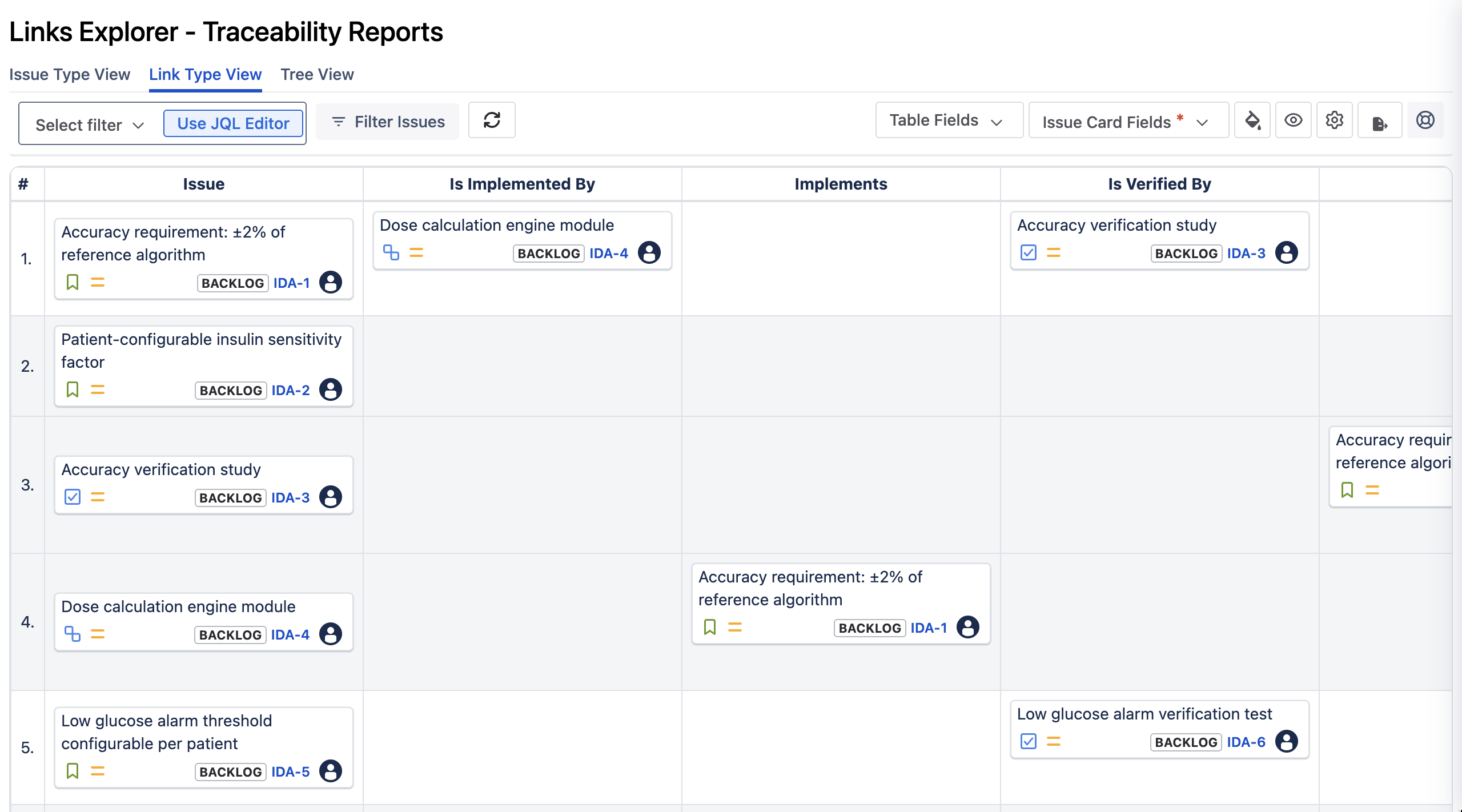
Build the RTM with Links Explorer
Step 1 — Define the Jira scope
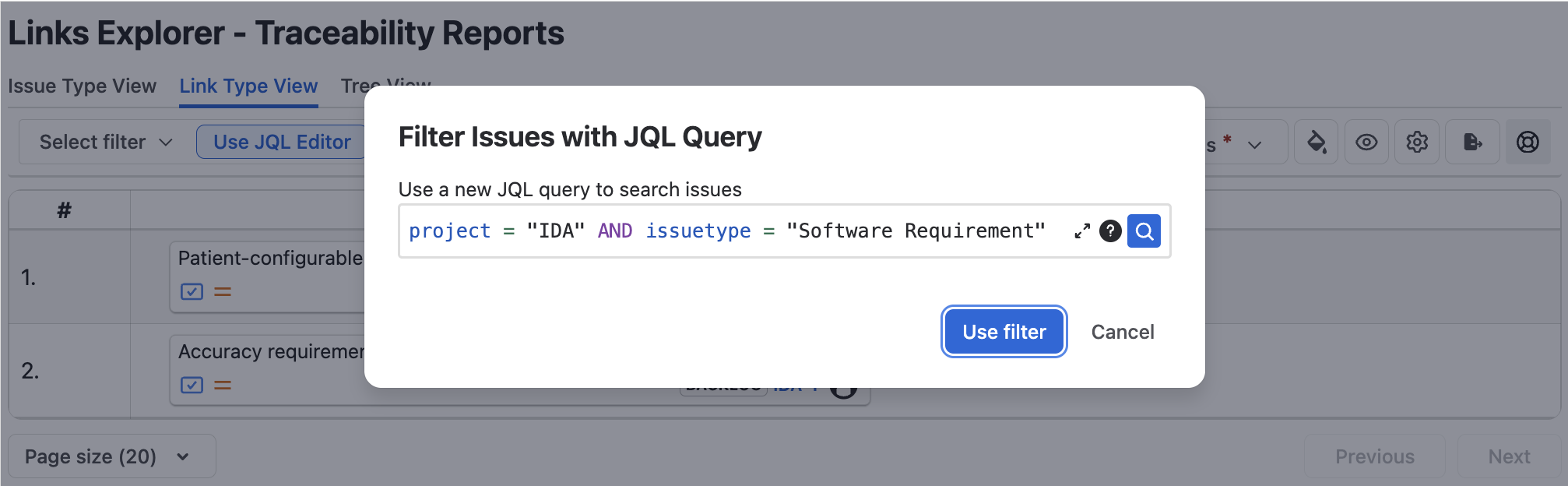
Use JQL to identify the work items you want to analyze.
project = "IDA" AND issuetype = "Software Requirement"
Step 2 — Choose the traceability depth
              Level 1: Requirement -> Test
              Level 2: Requirement -> Software Item -> Test
              Level 3: System Requirement -> Software Requirement -> Software Item -> Test
Links Explorer doesn't ask you to pick a depth up front — you expand each issue's linked issues node by node, going as deep as the question you're investigating needs: a verification review may only need to expand one level (Requirement -> Test), while an end-to-end audit review might expand all the way to Level 3, up to the tool's maximum traversal depth.
Step 3 — Generate and inspect the traceability view
Links Explorer follows the selected Jira work item relationships so the chain can be reviewed without manually rebuilding it in a spreadsheet.
Step 4 — Review the gaps
Look for orphan requirements, missing implementation relationships, missing upstream sources, unlinked tests, and incomplete bidirectional relationships. In the IDA project, IDA-2 is a real example of an orphan requirement — a Software Requirement with no linked work items at all.
Manual RTM vs. Jira-based traceability
| Manual spreadsheet |
Jira + Links Explorer |
| Export and copy data | Analyze existing Jira relationships |
| Build rows manually | Follow linked work items recursively |
| Search for gaps manually | Inspect traceability and orphan visibility |
| Repeat spreadsheet work | Reuse saved views or filters where appropriate |
| Snapshot of Jira | Generated from the Jira relationships being analyzed |
The goal isn't only speed. It's repeatability: traceability becomes something the team can inspect as development changes.
Practical review checklist
- Can every software requirement be traced upstream?
- Can every requirement be traced downstream to verification?
- Are risk-derived requirements connected to their source?
- Are implementing software items visible?
- Can orphan requirements be identified?
- Can tests be traced back to the requirements they verify?
- Does the view represent the current Jira relationships?
What's next?
An RTM becomes even more useful when the traceability chain includes risk controls. Next, we'll connect IEC 62304 software requirements with ISO 14971 risk controls and follow the relationship through implementation and verification.