Your AI coding assistant can now run your API tests.
Not in a "AI helps you write tests" way. In a literal way: you type a prompt into Claude Desktop, Cursor, or Windsurf - and vREST NG executes your test suite, creates new test cases, reads the results, and reports back. Without you opening the application.
This is possible because vREST NG now ships with a local MCP server.
If you haven't encountered the Model Context Protocol yet, this article explains what it is, why it matters specifically for API testing, and how to get your AI agent running your test suite in 15 minutes. If you already know MCP, skip to the setup section.
What Is the Model Context Protocol?
The Model Context Protocol (MCP) is an open standard developed by Anthropic that lets AI agents connect to tools and data sources through a standardised interface. Think of it as a universal plugin system for AI assistants.
Before MCP, if you wanted Claude Desktop or Cursor to interact with an external tool - your database, your file system, your testing framework - you had to build a custom integration from scratch. Different AI hosts, different APIs, different authentication patterns. It was fragmented and expensive to maintain.
MCP standardises this. Build an MCP server for your tool once, and any MCP-compatible AI host can connect to it. Claude Desktop, Cursor, Windsurf, VS Code - they all speak the same protocol.
The result: tools that were previously "AI-adjacent" (AI can help you write code for them) become "AI-native" (AI agents can directly operate them).
vREST NG is the first API testing tool to ship an MCP server.
Why API Testing Is a Natural Fit for MCP
API testing has a coordination problem that MCP solves directly.
The QA team knows what needs to be tested. The developer knows how the API works. But the person actually running the tests - triggering the suite, reading the failures, updating assertions - is often caught between both. This coordination overhead is one reason API test suites don't get run as often as they should.
AI agents remove that overhead. With an MCP server, an agent can:
- Read your test suite and understand what it covers
- Trigger a specific test suite when a deployment completes
- Parse the results and identify which assertion failed and why
- Create a new test case from a natural language description
- Update an existing test when an API endpoint changes
With vREST NG's local MCP server, all of these capabilities are exposed directly to your AI agent as callable tools - the same way a developer uses the CLI, but from inside the AI conversation your team is already having.
What the vREST NG MCP Server Exposes
When you run vrunner mcp --project /path/to/project , vREST NG starts a local MCP server that exposes the following tool set to your AI agent:
Test Execution
- Run a named test suite
- Run all test suites in a project
- Run a specific test case by ID
- Trigger a run against a specific environment (dev / staging / production)
Test Management
- List all test suites and test cases in a project
- Create a new test case (method, URL, headers, body, assertions)
- Update an existing test case
- Read test case details and current assertions
Results and Reporting
- Read the results of the last test run
- Get the list of failed assertions from a run
- Export results in JSON or XUnit format for CI/CD pipelines
This is the full functional surface of vREST NG - exposed as MCP tools. Your AI agent can do everything a human can do in the application, from a natural language prompt.
A Real Example: Asking Your AI Agent to Run Tests
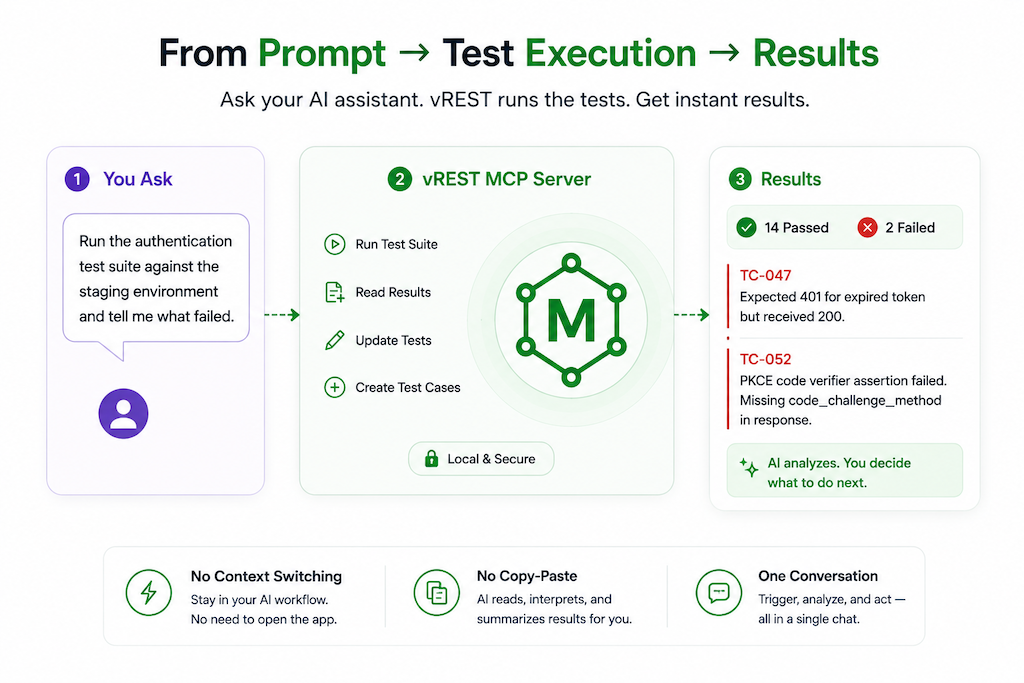
Once your MCP server is connected to Claude Desktop, a session might look like this:
You: Run the authentication test suite against the staging environment and tell me what failed.
Claude Desktop: Running now - calling vREST NG MCP.
The authentication test suite completed: 14 passed, 2 failed.
Failures:
- TC-047 — Expected 401 for expired token but received 200. The token expiry check appears disabled in staging.
- TC-052 — PKCE code verifier assertion failed. The response is missing the code_challenge_method field.
Should I update TC-052 to reflect the current staging behaviour, or flag it as a known bug in your tracker?
This kind of interaction - trigger, read, interpret, propose action - is what MCP enables. No context switching. No opening vREST NG. No copy-pasting test results between tools.
The same pattern works in Cursor mid-code review, or in Windsurf when a deployment completes. Your AI agent can check whether the APIs your code depends on still behave correctly, without leaving the workflow it's already in.
Why "Local" MCP Server Is the Right Architecture
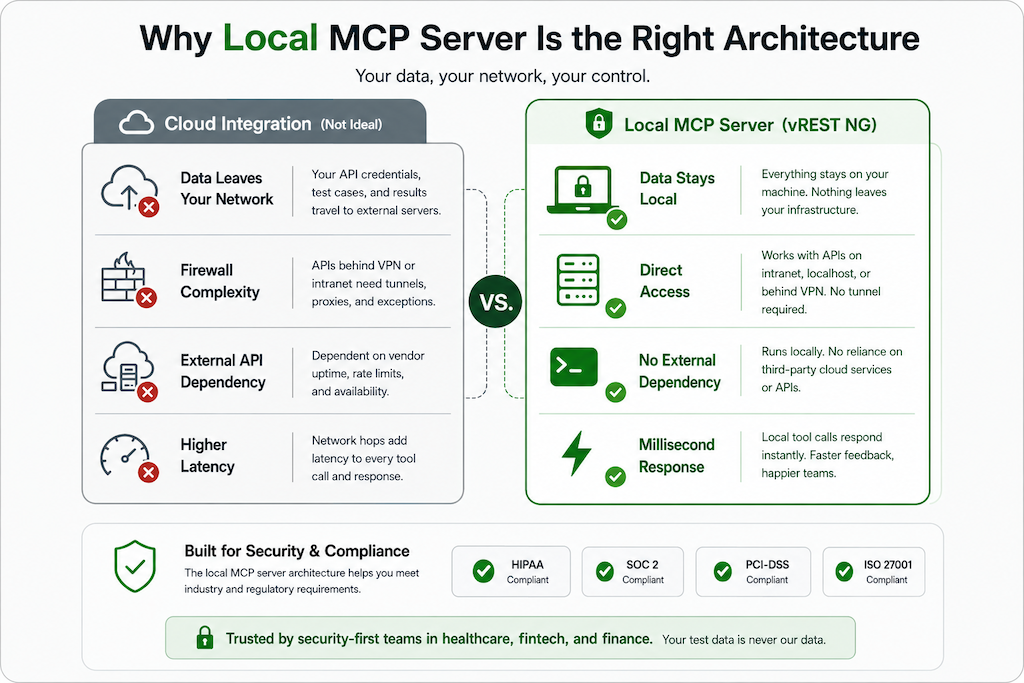
Some tools that connect to AI agents do so via cloud APIs - the AI agent calls a remote server hosted by the vendor, which then interacts with your tool.
vREST NG's MCP server runs locally. It is not a cloud service, not a SaaS API, not a webhook to an external system. This design choice matters for several reasons.
Security and data privacy. Your API credentials, test cases, and response data never leave your infrastructure. The MCP server communicates between your local AI agent host and your local vREST NG project. Nothing passes through Optimizory's servers.
No tunnel required. APIs hosted on your intranet or localhost are fully accessible. No ngrok. No reverse proxy. No firewall exceptions. This is the same reason vREST NG's test runner works behind corporate firewalls without cloud dependency - the architecture is consistent.
Compliance. If your team operates under HIPAA, PCI-DSS, SOC 2, or ISO 27001, the local architecture means your test data stays within your security boundary. Teams at Kaiser Permanente and SIX Group chose vREST NG in part for this reason - the MCP integration inherits the same trust model.
Speed. Local tool calls respond in milliseconds. No round-trip to a remote API. Your AI agent's interactions with the test suite feel immediate.
How to Set It Up in 15 Minutes
What you need before starting:
- vREST NG desktop app installed (free trial available at vrest.io)
- At least one project with test cases
- Node.js installed (to install vrest-ng-cli)
- Claude Desktop, Cursor, or Windsurf as your AI agent host
Step 1: Install vrest-ng-cli
                      npm install -g vrest-ng-cli
                      vrunner --version
You should see a version number confirming the install.
Step 2: Start the MCP Server
vrunner mcp --project /path/to/your/vrest-ng-project
You'll see: vREST NG MCP server running on stdio
The server stays running in this terminal window. It listens for tool calls from your connected AI agent.
Step 3: Connect Your AI Agent
vrunner mcp --project /path/to/your/vrest-ng-project
For Claude Desktop:
Open Claude Desktop → Settings → Developer → Edit config file. Add:
                      {

                      "mcpServers": {

                      "vrest-ng": {

                      "command": "vrunner",

                      "args": ["mcp", "--project", "/path/to/your/vrest-ng-project"]

                        }

                     }

                  }
Restart Claude Desktop. You'll see vREST NG listed as a connected tool.
For Cursor or Windsurf:
Navigate to AI Assistant settings → MCP Servers → Add server. Use vrunner as the command and ["mcp", "--project", "/path/to/project"] as the arguments.
Step 4: Verify the Connection
Ask your AI agent: "List the test suites in my vREST NG project."
If it returns your suite names, the connection is working. You're set up.
Full setup documentation with screenshots is in the vREST NG docs →
What Changes in Your QA Workflow
Immediate change: speed.
Triggering a suite, reading failures, and updating a test case used to mean: open vREST NG → navigate to project → find suite → run → wait → read results → find test case → edit assertion. Five to ten minutes for a routine check. With the MCP server: one prompt, thirty seconds.
Medium-term change: ownership.
If your AI coding assistant already runs inside Cursor or Claude Desktop throughout your development workflow, your test suite is now part of that workflow - not a separate tool you switch to, and not a task you delegate to a different team member. A resource your agent can check, update, and report on in the same session where you're writing code.
Longer-term change: autonomous pipelines.
Teams moving toward fully automated CI/CD workflows - where an AI agent reviews a pull request, runs tests, interprets failures, and files issues - need an API testing layer that the agent can operate directly. vREST NG's MCP server is that layer.
Frequently Asked Questions
Does the MCP server require an internet connection?
No. The vREST NG MCP server runs entirely on your local machine. It communicates between your AI agent and your local project files. No internet connection is required for the MCP server itself to function.
Which AI agents are compatible?
Any MCP-compatible AI host works: Claude Desktop, Cursor, Windsurf, VS Code with MCP support, and any other tool that implements the Model Context Protocol. The protocol is open - vREST NG is not locked to a specific AI vendor.
Can the AI agent create test cases from scratch?
Yes. Using the create_test_case tool, your AI agent can create a complete test case - HTTP method, URL, headers, request body, and assertions - from a natural language description. You can review and edit the generated test case in the vREST NG UI before including it in your suite.
Does this work for APIs behind a corporate firewall?
Yes. Because the MCP server runs locally, it has the same network access as your machine. APIs on your intranet, localhost, or behind a VPN are all accessible. No tunnel required.
Is my test data secure?
Your test cases, API credentials, and response data stay on your machine. The MCP server does not transmit data to external servers. The same security properties that make vREST NG appropriate for healthcare and fintech teams apply to the MCP integration.
What version of vREST NG includes the MCP server?
The MCP server is available via vrest-ng-cli v3.6.0 and later. Run vrunner --version to check your version, and npm update -g vrest-ng-cli to upgrade.
Do I need a Pro or Enterprise licence to use MCP?
The MCP server is available on all vREST NG editions. Check the pricing page for edition details.
Where This Sits in the Larger Picture
MCP is becoming the standard interface between AI agents and professional tools. In the same way that REST APIs became the default way web services communicate, MCP is becoming the default way AI agents interact with external systems.
The tools that ship MCP servers now - before the standard is universally adopted - establish themselves as the default in their category for AI-native workflows. When a developer configures their AI agent's toolset, they pick from what's available. Being available, and being first, matters.
No other API testing tool has shipped an MCP server as of this writing. Postman has 30 million users. Katalon serves enterprise teams in 160 countries. Neither has an MCP server yet.
This window - where the category is unclaimed and the search queries are just beginning to form - is the right moment to try it. Fifteen minutes of setup. If your team already uses Claude Desktop or Cursor, you don't need any new tooling. Just vrest-ng-cli and one configuration file.