A software requirement doesn't always start with another software requirement. Sometimes it exists because a risk needs to be controlled.
That creates an important relationship between risk management and software development: risk → risk control → software requirement → implementation → verification.
If those relationships live in separate documents or separate systems, proving the connection becomes harder every time an auditor asks for it. If they're represented in Jira instead, they become part of the same traceability model we've been building across this series: the same IDA project, the same issue links, no second source of truth.
Start with the risk
Consider a risk that already applies to the IDA project's dose calculation engine: sensor drift over time could push the calculated insulin dose outside the accuracy tolerance the software is required to meet. A risk control could require the system to detect that drift and recalibrate before it affects a dose calculation. That control is what gives rise to a concrete, testable software requirement.
              Risk
                |
                v
              Risk Control
                |
                v
              Software Requirement
                |
                v
              Software Implementation
                |
                v
              Verification
Mapped onto the IDA project, the bottom two links of that chain are already familiar from the last article:
              Risk: Sensor drift causes the calculated dose to exceed the ±2% tolerance
                |
                |  risk control
                v
              IDA-7  Risk Control: Real-time sensor drift detection and recalibration
                |
                |  drives
                v
              IDA-1  Software Requirement (Accuracy requirement: ±2% of reference algorithm)
                |
                |  verified by
                v
              IDA-3  Test Case (Accuracy verification study)
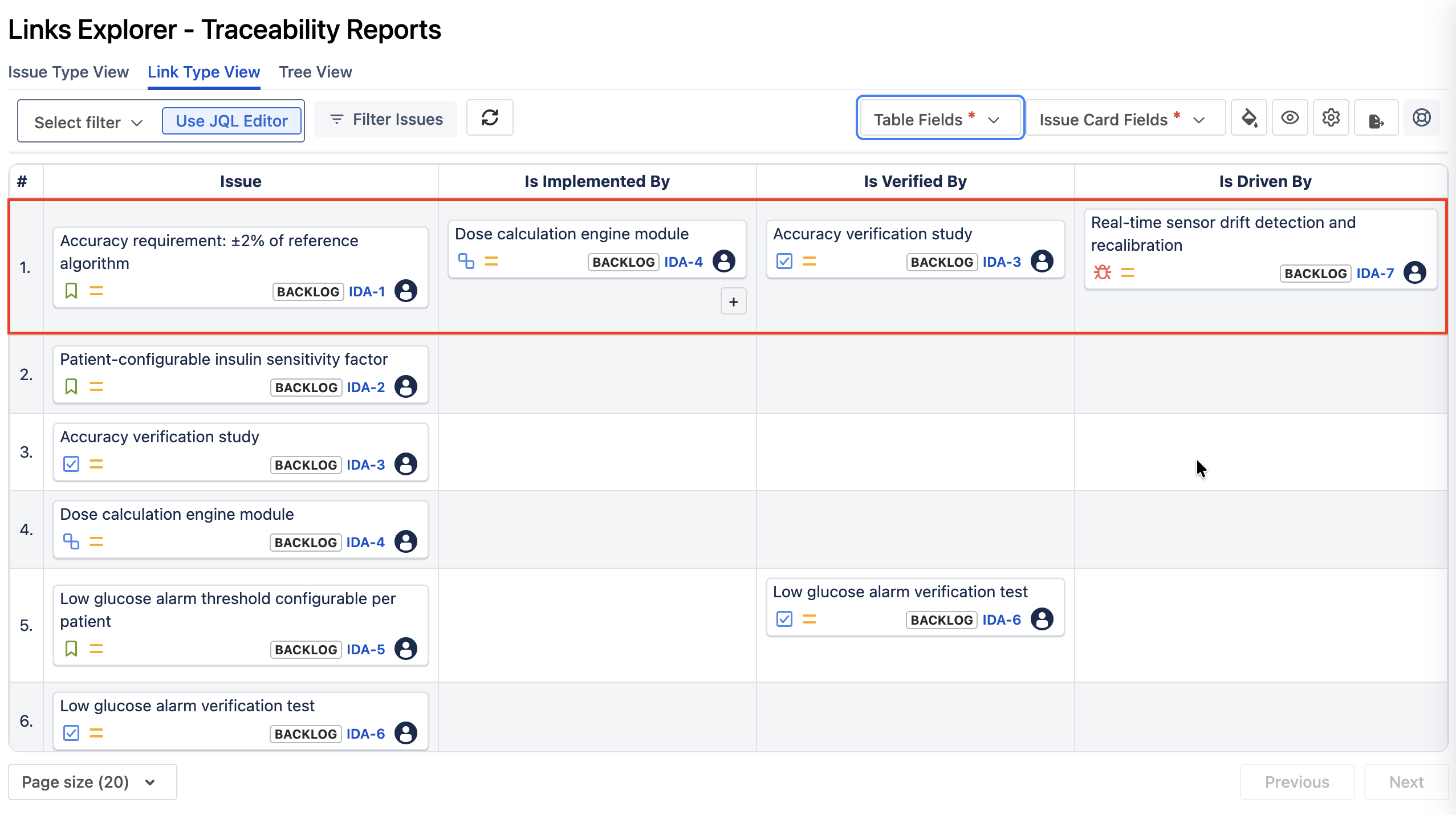
Nothing about IDA-1 and IDA-3 changes here. What changes is that the requirement now has an upstream reason to exist, not just a downstream verification. IDA-7 is the risk control's own Jira work item, connected to IDA-1 with a drives link, the same pattern the next section covers.
Represent risk controls in Jira
The same principle we used for defining explicit, directional link types instead of a generic “relates to” still applies here: represent the risk control as its own Jira work item, and connect it to the software requirement it drives with a link type that says what it means, something like mitigates or drives, rather than a generic relates to. That's exactly what IDA-7 is in the IDA project: a Risk Control issue linked to IDA-1 with a drives relationship.
| Artifact |
Jira representation |
| Hazard / risk | Risk issue type (or a linked risk-management record) |
| Risk control | Risk Control issue type, linked to the risk it mitigates |
| Software requirement | Software Requirement issue, linked to the risk control it implements |
The exact issue types and link names should match your organization's own process. The important principle is that the relationship has a clear meaning and is maintained consistently, the same way IDA-1's verified by link to IDA-3 is maintained consistently across this series.
Where Links Explorer fits
Once the relationships are stored in Jira, Links Explorer can be used to inspect the chain instead of reviewing each issue separately. Start from a requirement to see its source and its downstream implementation, or start from a risk-related artifact and follow the chain forward to see everything it eventually produces.
Finding a broken risk-to-requirement chain
The missing relationship is usually more important than the perfect one. Imagine a risk control marked as addressed in your risk management process, but the corresponding Jira software requirement has no visible link back to it. The implementation and the test might both exist and both look fine on their own, but the reasoning connecting the risk to the software is difficult to demonstrate, and that's exactly the gap an auditor will ask about.
A few questions are worth asking of every risk-derived requirement in the IDA project:
- Does every relevant risk control have a software connection?
- Does every risk-derived software requirement identify its upstream source?
- Does the requirement have an implementation relationship?
- Does the chain continue to verification?
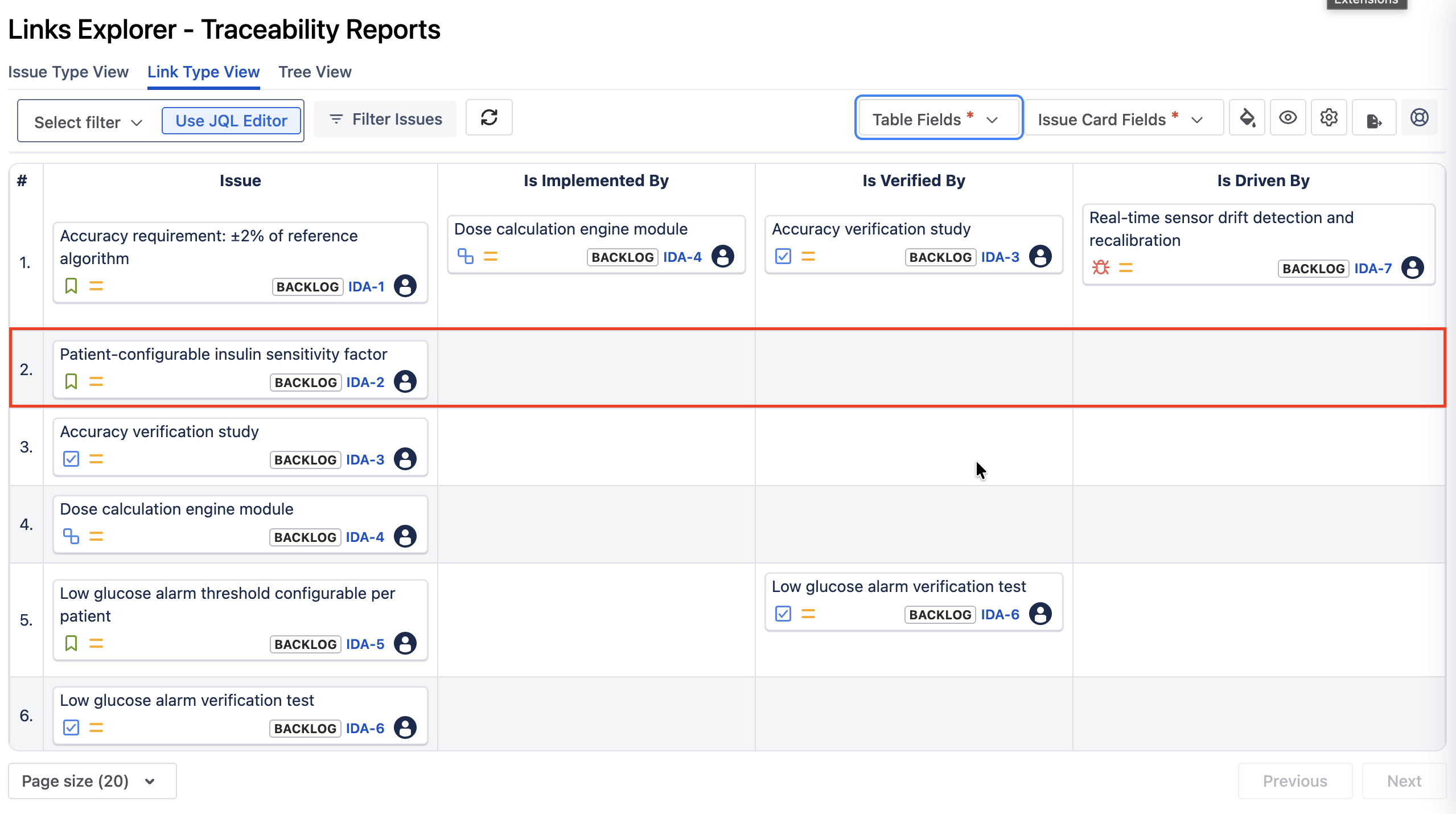
In the IDA project, IDA-2 is exactly this case: a Software Requirement with no upstream risk control, no implementation, and no verification linked. In the same Link Type View used above, that shows up as a row with every cell empty:
Make the relationship part of the workflow
              Risk Control Created
                |
                v
              Software Requirement Created
                |
                v
              Risk-control relationship added
                |
                v
              Implementation relationship added
                |
                v
              Verification test created
                |
                v
              Verification relationship added
The goal is to make these relationships part of normal development, created and linked as the work happens, rather than something assembled just before an audit.
A useful review pattern
| Question |
What to look for |
| Where did this requirement come from? | System requirement or applicable risk control |
| What addresses it? | Software item / architecture relationship |
| How is it verified? | Test case and verification evidence |
| Can I navigate backwards? | Test → requirement → source |
| Is anything orphaned? | Requirements or controls with missing expected relationships |
What's next?
A well-structured Jira project can still contain gaps. Next, we'll look at five common IEC 62304 traceability gaps in the IDA project and show how to spot them before an auditor does.